Export Metadata
The Export Metadata module enables extraction of hierarchy and property data from EPMware to various file formats. It provides flexible configuration for exporting metadata to files, database views, or custom formats for reporting, backup, and integration purposes.

Export module showing the five configuration tabs
Overview
The Export module consists of five integrated components:
- Export Profile - Define export configurations and formats
- Export Details - Specify dimensions and properties to export
- Export Format - Configure output structure and columns
- Export - Execute exports and download results
- Export Book - Group multiple exports for batch execution
Key capabilities include:
- Multiple export formats (Parent-Child, Generations, Custom)
- Property selection and filtering
- Pre/post-processing scripts
- Database view integration
- Batch export books
- Multi-environment support
Export Profile
Export profiles define the overall configuration for metadata exports, including format type, generation settings, and processing scripts.

Export Profile configuration screen
Profile Configuration
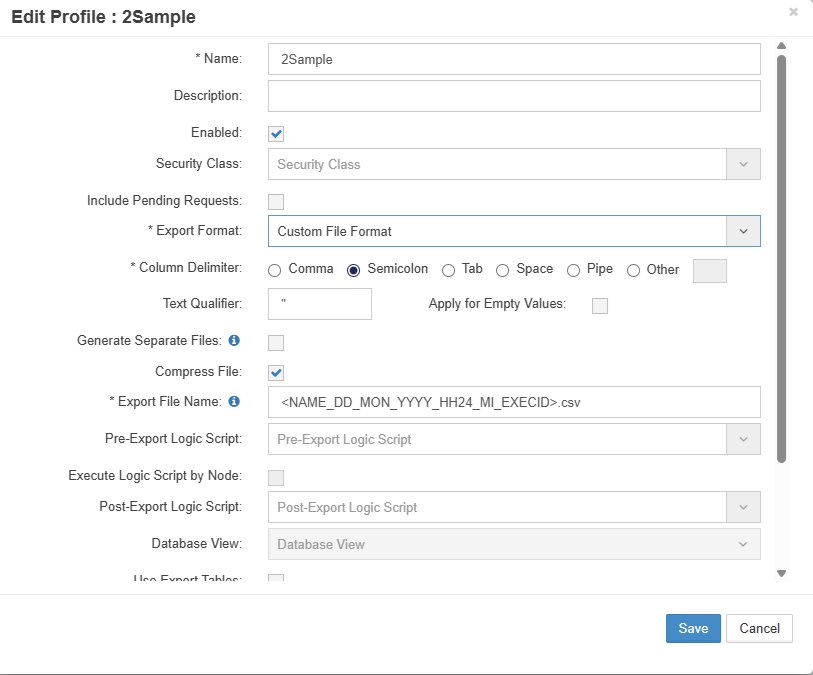
Create Profile dialog with format options
Creating Profiles
- Select Export Profile tab
- Click the + icon to display the Create Profile popup box.
- Configure profile settings:
| Field | Required | Description | Options |
|---|---|---|---|
| Profile Name | Yes | Unique identifier | User-defined |
| Description | No | Profile purpose | Text |
| Export Format | Yes | Output structure | See formats below |
| # of Generations | Conditional | For Generation format | 1-20 |
| Show Member Name in Generations | Conditional | Include names | Y/N |
| Fill Generations | Conditional | Fill empty cells | From dropdown |
| Column Delimiter | Conditional | Custom format delimiter | Comma, Tab, Pipe |
| Text Qualifier | Conditional | Text enclosure | Quotes, None |
| Pre Logic Script | No | Pre-processing | Logic Builder script |
| Post Logic Script | No | Post-processing | Logic Builder script |
| Database View | Conditional | View name | For DB view format |
| Environment | Conditional | Target environment | Multi-environment only |
Export Details
The Application and Dimension to be exported are configured using the Export Details tab.

Export Details configuration screen
Configuring Details

Export Details configuration dialog
- Select Export Details tab
- Select Export Profile from dropdown
- Click + icon to add dimension
- Configure dimension export:
| Field | Description | Example |
|---|---|---|
| Application Name | Source application | HFM_PROD |
| Dimension | Dimension to export | Entity |
| Top Level Member (Optional) | Select Top Level Member name from dropdown | Total_Entity |
| Include Top Member (Optional) | Include Top Node in Export | Total_Entity |
| Member Name (Optional) | Specific member filter | US_Operations |
| Export Sequence # (Optional) | Order in export | 10, 20, 30 |
| Base Members Only (Optional) | Exclude parents | ✓ |
| Include Shared Members (Optional) | Export shared instances | ✓ |
| Expand Shared Nodes (Optional) | Expand Nodes | ✓ |
| Show Properties for Shared Members (Optional) | Properties on shared | ✓ |
| Consider Shared Instances of Parent Members as Base Members (Optional) | Treat shared instances of parent members as base members during export | ✓ |
| Remove Duplicates using Property Values (Optional) | Remove duplicates based on property value | ✓ |
| Enabled | Enabled or disable App-dim config | ✓ |
| Include Inactive Members (Optional) | Include inactive members in the export output | ✓ |
Add Multiple Dimension Configuration using Bulk Upload
Upload multiple dimensions via CSV:
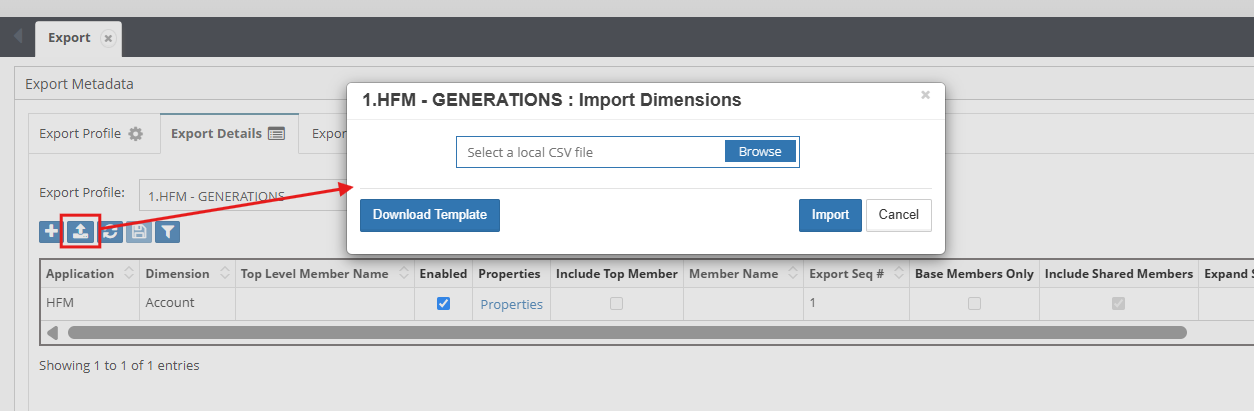
- Click upload icon
- Select CSV file with format:
Application Name,Dimension,Top Level Member Name,Member Name Wild Card
HFM,Account,TB,
HFM,RATES,CS,A*
Property Selection
Click Properties hyperlink to select specific properties:

Property selection for export
Property options:
- Select All - Include all properties
- Select Specific - Choose individual properties
- Categories - Select by category
- Primary Key - Selected properties form a unique key to identify and remove duplicate records,This option is enabled when "Remove Duplicates using Property Values" enabled
Filtering Options
Apply filters to export details : based on Application or dimension

Export Format
Define the structure and columns for the export output.

Export Format configuration screen
Format Configuration
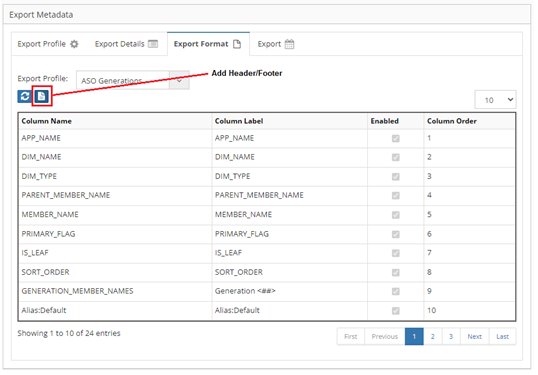
Add Header and Footer Icon
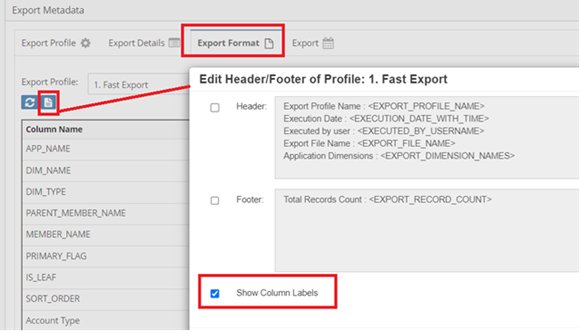
Header and Footer Configuration Screen
Export Execution
Run configured exports and download results.

Export execution screen with history
Running Exports
- Select Export tab
- Choose export type:
- Profile - Single profile export
- Book - Export book execution
- Select specific profile or book
- Click Export button
Export Progress
Monitor export execution:

Export progress indicator
Progress indicators:
- Initialization
- Data extraction
- Transformation
- File generation
- Completion
Export History
Each export creates a row in the grid:
| Column | Description |
|---|---|
| Execution ID | Unique identifier |
| Name | Export Profile/Book name |
| Start Time | Execution start |
| End Time | Completion time |
| Output File | Download Export files |
| Status | Success/Failed |
| Message | Export Run message / error message in case of failure |
Downloading Results
- Click download icon (📥) in grid row
- File downloads to browser
- File naming:
ProfileName_YYYYMMDD_HHMMSS.ext
Export Book
Export Books group multiple export profiles for batch execution.

Export Book configuration screen
Creating Books
Create Book dialog
- Select Export Book tab
- Click + icon
- Input the Book Name and Description (Optional)
- Select an Enabled
- Select Security class
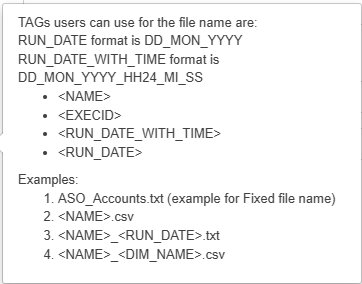
- Input the file name
6. Select Merge files and Compress files (Optional)
7. Select Save
Adding Profiles to Books
- Select book from grid
- Click Export Profiles
- Move profiles from Available to Assigned
- Set execution order
- Click Save
Book Execution
Books can:
- Execute all profiles in sequence
- Merge results into single file
- Compress output to ZIP
- Apply book-level scripts
- Send consolidated notifications
Example: Complete System Export
Book Name: FULL_SYSTEM_BACKUP
Description: Complete metadata backup
Profiles:
  1. ENTITY_HIERARCHY
  2. ACCOUNT_HIERARCHY
  3. CUSTOM_DIMENSIONS
  4. SECURITY_ASSIGNMENTS
  5. PROPERTY_MAPPINGS
Merge Files: Yes
Compress: Yes
Output: BACKUP_20240315_230000.zip
Export Examples
Example 1: Financial Consolidation Export
Profile Configuration:
Name: FIN_CONSOLIDATION
Format: Parent-Child
Description: Financial consolidation hierarchies
Details:
Application: HFM_PROD
Dimensions:
  - Entity (all properties)
  - Account (selected properties)
  - Custom1 (base members only)
Output:
Parent,Child,Description,Currency,Status
Total_Entity,NA,North America,USD,Active
NA,USA,United States,USD,Active
NA,Canada,Canada,CAD,Active
Example 2: Planning Generations Export
Profile Configuration:
Name: PLAN_GENERATIONS
Format: Generations
Generations: 6
Show Member Name: Y
Output:
Gen1,Gen2,Gen3,Gen4,Gen5,Gen6,Alias,UDA
Total,Revenue,Product_Rev,Hardware,Servers,Server_A,Server Model A,Critical
Total,Revenue,Product_Rev,Hardware,Servers,Server_B,Server Model B,Standard
Example 3: Security Export
Profile Configuration:
Name: SECURITY_EXPORT
Format: Custom Database View
View: VW_SECURITY_EXPORT
Details:
Include:
  - Member security classes
  - Access levels
  - User assignments
Best Practices
1. Profile Design
- Naming Convention - Use descriptive, consistent names
- Documentation - Maintain descriptions
- Reusability - Create generic profiles
- Version Control - Track profile changes
- Testing - Validate in non-production
2. Performance Optimization
- Disable Export Tables - For large exports
- Filter Data - Export only needed members
- Batch Processing - Use books for multiple exports
- Off-Peak Execution - Schedule during low usage
- Compression - ZIP large files
3. Data Quality
- Validation Scripts - Pre-export checks
- Property Selection - Export relevant properties only
- Consistent Format - Standardize across exports
- Archive Exports - Maintain history
- Error Handling - Check logs for issues
4. Integration
- Scheduling - Automate regular exports
- File Naming - Use patterns for downstream systems
- Notifications - Alert on completion/failure
- Post-Processing - Transform for target systems
- Security - Encrypt sensitive exports
Troubleshooting
Common Issues
| Issue | Cause | Solution |
|---|---|---|
| Export timeout | Large data volume | Increase timeout, disable export tables |
| Missing properties | Not selected | Check property selection in Details |
| Wrong format | Profile misconfigured | Verify format settings |
| Empty export | Filters too restrictive | Review filter criteria |
| Generation columns empty | Depth insufficient | Increase # of generations |
| File not downloading | Browser blocked | Check download settings |
| Book fails | Profile error | Test profiles individually |
Performance Tuning
Optimize export performance:
Global Settings → Application Settings:
- Maximum # of Minutes for Export Task: 180
- Disable Export Tables: For large exports
- Batch Size: Adjust for memory usage
Export Logs
Review export logs for:
- Row counts
- Processing time
- Warning messages
- Error details
- Memory usage
Database Views
For custom database view exports:
-- Verify view exists and is accessible
SELECT * FROM user_views WHERE view_name = 'VW_YOUR_EXPORT';

-- Check view permissions
SELECT * FROM user_tab_privs WHERE table_name = 'VW_YOUR_EXPORT';

-- Test view query
SELECT COUNT(*) FROM VW_YOUR_EXPORT;
Integration Points
Logic Builder
Pre/post-processing scripts:
- Data validation
- File archival
- Transformation logic
- Integration calls
Scheduling
Automate exports:
- Regular backups
- Reporting cycles
- System integration
- Compliance requirements
Email Notifications
Export notifications:
- Completion alerts
- Error notifications
- File attachments
- Distribution lists
External Systems
Integration patterns:
- File-based integration
- Database views
- API consumption
- ETL processes
Related Topics
- Logic Builder - Create pre/post export scripts
- Global Settings - Export timeout configuration
- Email Templates - Export notifications
- Adminstration - Services and Migration Module details