Global Settings Configuration
Global Settings configure system-wide parameters for the entire EPMware application. These settings control email services, application behavior, web interface options, and user-defined fields that affect all modules and users.

Global Settings module with configuration tabs
Overview
Navigate to Configuration → Misc → Global Settings to configure system-wide settings organized into four main categories:
- Email Settings - Configure email service and notification parameters
- Application Settings - System behavior, performance, and integration options
- Web Settings - User interface and web application configuration
- User Defined Settings - Custom fields for request management
Email Settings
Email Settings control all global email configuration for workflow notifications and system communications.

Email Settings configuration tab
Configuration Options
| Setting | Description | Required | Example |
|---|---|---|---|
| From Email Address | Sender address for all workflow emails in EPMware. Specify “From Email Address” (For example, ADMIN@EPMWARE.COM) Note: For cloud customers, AWS verification is required for the “From Email Address”. Please contact EPMWARE support team for AWS Email Verification. | Yes | admin@epmware.com |
| Override Email Address | Redirect all emails to single address (testing) | No | test@company.com |
| Failed Email Forwarding Address | Receive notifications for failed emails | No | it-support@company.com |
| Append Fixed value for Email Subject (Prefix) | Environment identifier prefix | No | [TEST] or [PROD] |
Email Service Configuration
EPMware supports two email service options:
Option 1: AWS SES (Simple Email Service)
Configuration Steps:
- Determine sender email address (e.g.,
finance@company.com) - Contact EPMware support to initiate AWS verification
- AWS sends verification email to the address
- Complete verification process
- Set verified address in "From Email Address"
AWS SES Documentation
For security team inquiries, refer to: AWS SES FAQs
Option 2: Client SMTP Server
Required Information:
- SMTP Server Name
- SMTP Port
- SMTP Username
- SMTP Password
Configuration Example

Example email configuration for production environment
Best Practices:
- Environment Prefixes - Use clear identifiers:
[PROD]for production[UAT]for user acceptance testing-
[DEV]for development -
Override Address - Only use in non-production environments
-
Failed Email Monitoring - Always configure for production
Editing Email Settings
- Double-click the Value field to enter edit mode
- Enter or modify the setting value
- Update the Description if needed
- Click Save icon to apply changes
Application Settings
Application Settings control system behavior, performance parameters, and operational configurations.

Application Settings with system configuration options
All Application Settings
| Option | Description | Default Value |
|---|---|---|
| Allow Delete/Cancel of Related Request Lines | Request lines generated through dimension mapping or automation can be deleted or canceled if this setting is set to Y | N |
| Application Import - Total Interval in Seconds before TimeOut | Total Interval in Seconds for App Import to finish before TimeOut | 3000 |
| Application Import - sleep interval in Seconds | Wait Interval in Seconds for App Import | 10 |
| Auto Refresh Interval (Seconds) | # of seconds to wait before Auto Refreshing certain screens like Deployment monitor pafe | 60 |
| Database Trace identifier | Debug database Trace identifier | ew_trace |
| Date Format | Specify Date Display format (For example MM/DD/RRRR) | MM/DD/RRRR |
| Debug Level | Specify Debug Level (1-Error only, 2 Warning,3-All) | 3 |
| Debug Purge Days | Specify # of Days to retain Debug information | 30 |
| Deployment Service Sleep Interval | Deployment Service Sleep Interval (Seconds) | 5 |
| Disable All Logic Builder Scripts | Enable/Disable execution of Logic Builder Scripts (Standard or Custom) | N |
| EPMWare Application URL | Specify URL of the EPMWARE application | https://demo.epmwarecloud.com |
| ERP Import Service Sleep Interval | ERP Import Service Sleep Interval (Seconds) | 5 |
| Enable Workflow based Security for Requests Dashboard | If enabled,Dashboard will show only those requests to users they have access to Workflows assigned to the requests | Y |
| File Archives DB Directory | Specify DB directory to archive files | EW003_ARCHIVE_DB_DIR |
| Maximum # of Minutes for the Deployment Task to finish before TimeOut | Maximum # of Minutes for the Deployment Task to finish before TimeOut (Default Value - 180) | 180 |
| Maximum # of Minutes for the ERP Import Task to finish before TimeOut | Maximum # of Minutes for the ERP Import Task to finish before TimeOut (Default Value - 180) | 180 |
| Maximum # of Minutes for the Export Task to finish before TimeOut | Maximum # of Minutes for the Export Task to finish before TimeOut | 180 |
| Maximum file size in MB for All Modules | Specify Maximum file size in MB for all modules | 300 |
| Maximum file size in MB for ERP Import | Specify Maximum file size in MB used during ERP Import | 50 |
| Maximum file size in MB for Migration Import | Specify Maximum file size in MB used during Import in Migratoin Module | 200 |
| Maximum file size in MB for Request Attachments | Specify Maximum file size in MB for Request Attachment | 20 |
| Oracle Character Set | FYI: AL32UTF8 for American Char Set.. WE8ISO8859P1 for Western European Characters | AL32UTF8 |
| Organization Logo Height (Pixels) | Specify Organization Logo Height (Pixels) | 25 |
| Organization Logo URL | https://www.epmware.com/wpcontent/uploads/2016/03/Epmware_RGBmed1.jpg | |
| Organization Logo Width (Pixels) | Specify Organization Logo Width (Pixels) | 172 |
| Organization Name | Specify Organization name | EPMware Inc. |
| SSH port for Agent Service | SSH Port for Agent Service | 22 |
| Show # of nodes per page in Hierarchies | Show # of nodes per page in Hierarchies in Metadata Explorer and Request Pages | 100 |
| Show Descendants of a parent member for its shared instances | If a parent member is shared then shared instances are treated as Parent Members like its Primary Instance if this setting is enabled. | Y |
| Show Member Description by default | Y/N value to determine if member description to be displayed by default or not | Y |
| Show or Hide System Generated Request lines | Y/N value to determine if system generated Request lines by default should be by displayed or not. | Y |
| Specify prefix for the Debug Files | Specify prefix for the Debug Files | ew_debug |
| Specify prefix for the Report Files | Specify prefix for the Report Files | ew_report |
| Stage DB Directory | Specify DB directory for deployment staging file generations | EW003_STAGE_DB_DIR |
| Temp DB Directory | Specify DB directory for temporary file generations | EW003_TEMP_DB_DIR |
| Turn on/off Database Trace | If enabled Database Tracing is turned on for the current session | N |
| Turn on/off debug messages | Enable/disable debug messaging | Y |
| Turn on/off debug messages to be inserted into debug table | Enable/disable debug messaging in table | Y |
| Unzip - Sleep Interval in Seconds | Wait Interval in Seconds for Unzip | 20 |
| Unzip - Total Interval in Seconds before TimeOut | Total Interval in Seconds for Unzip to finish before TimeOut | 1200 |
| User Authentication Directory Type (LDAP or MSAD) | User Authentication Directory Type (LDAP or MSAD) | LDAP |
| User Authentication Directory Type option enabled or not | User Authentication Directory Type (LDAP or MSAD) | Y |
| Workflow Service Sleep Interval | Workflow Service Sleep Interval (Seconds) | 5 |
| Allow Delete/Cancel of Related Request Lines | Request lines generated through dimension mapping or automation can be deleted or canceled if this setting is set to Y | N |
| Password Minimum Length | Specify Minimum Length of Password of Native Users | 8 |
| Password Maximum Length | Specify Maximum Length of Password of Native Users | 20 |
| Password Uppercase Character Required | At least one Uppercase character required in Password of Native Users | Y |
| Password Lowercase Character Required | At least one Lowercase character required in Password of Native Users | Y |
| Password Numeric Value Required | At least one Numeric Value required in Password of Native Users | Y |
| Password Special Character Required | At least one Special Character required in Password of Native Users | Y |
| Environment Name | Specify Environment Name like PROD, TEST to indicate which environment the user has logged into to be shown on the Main Page | |
| Environment Name Background Color | Specify background color for the Environment name (e.g. None, Red, Blue, Green, Orange, Purple, Lightblue) | None |
| Environment Name Font Color | Specify font color for the Environment name (e.g. White, Red, Blue, Green, Orange) | Blue |
| Environment Name Font Size | Specify font size for the Environment name (e.g.10,11,12,13) | 12 |
| Environment Name Position | Specify the Environment name position on the main page (Allowed values: Left, Center, Right) | Center |
| Account Lockout – Maximum Invalid Attempts | Maximum # of consecutive invalid login attempts allowed before the user account is locked | 5 |
| Account Lockout – Unlock Duration(Minutes) | Maximum # of minutes after which a locked user account will be automatically unlocked | 5 |
| Debug - Derived Properties in Export Module | To help debug Export Performance for Derived Properties | N |
| Invalid Characters for Member Name | Specify characters that are not allowed in Member Names (e.g. $%#). Any member name containing these characters will be rejected | |
| Invalid Characters for Property Value | Specify characters that are not allowed in Property Values (e.g. $%#). Any property value containing these characters will be rejected |
Application Setting Examples
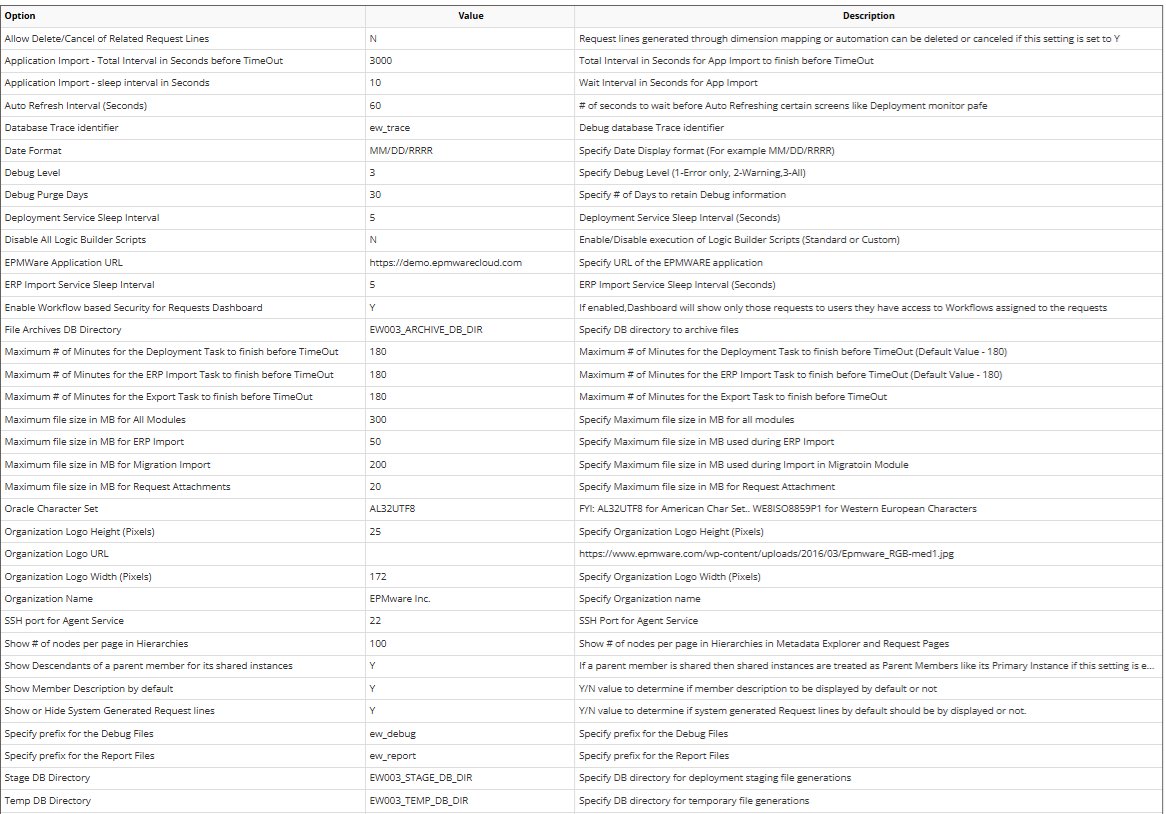
Editing Application Settings
- Double-click the Value or Description field
- Modify the setting as required
- Click Save icon to apply changes
Service Restart
Some settings may require service restart to take effect. Check with EPMware support before modifying critical system parameters.
Web Settings
Web Settings - Future use.
User Defined Settings
User Defined Settings create up to three custom fields (UDF1, UDF2, UDF3) for the Request page, capturing additional business-specific information.

User Defined Field configuration
Field Configuration Options
| Property | Description | Options |
|---|---|---|
| Enabled | Activate the field | On/Off |
| Required | Make field mandatory | On/Off |
| Data Type | Field data type | String/Numeric/Date |
| Display Type | Input method | Input/Lookup |
| Display Label | Field label on request | Custom text |
| Lookup | Reference lookup table | Lookup name |
| LOV SQL | Dynamic list of values | SQL query |
| Description | Field help text | Custom text |
Configuration Examples
Example 1: Request Type Field (UDF1)
Enabled: On
Required: On
Data Type: String
Display Type: Lookup
Display Label: Request Type
Lookup: REQUEST_TYPES
Description: Select the type of metadata request
Example 2: Cost Center Field (UDF2)
Enabled: On
Required: Off
Data Type: String
Display Type: Input
Display Label: Cost Center
Description: Enter cost center code
Example 3: Effective Date Field (UDF3)
Enabled: On
Required: On
Data Type: Date
Display Type: Input
Display Label: Effective Date
Description: Date when changes should take effect
Dynamic List of Values (LOV SQL)
Instead of static lookups, use SQL to generate dynamic dropdown values:
SQL Requirements
LOV SQL must return four columns: 1. lookup_code - Stored value 2. meaning - Display value 3. description - Optional tooltip 4. seq_num - Sort order
Example 1: Security Groups with Filter
-- Show security groups containing 'APPR'
SELECT name lookup_code,
       name meaning,
       description description,
       rownum seq_num
FROM ew_groups
WHERE name LIKE '%APPR%'
ORDER BY name
Example 2: Requestor's Groups
-- Show groups for current requestor
SELECT REPLACE(rg.group_name,'REQUESTORS - ','') lookup_code,
       REPLACE(rg.group_name,'REQUESTORS - ','') meaning,
       rg.group_name description,
       rownum seq_num
FROM ew_user_groups_v rg,
     ew_request_headers h
WHERE h.request_id = :request_id  -- Bind variable
  AND rg.user_id = h.requested_by
  AND rg.group_name LIKE 'REQUESTORS - %'
Bind Variable
The :request_id bind variable is automatically available in UDF LOV SQL queries.
Editing User Defined Settings
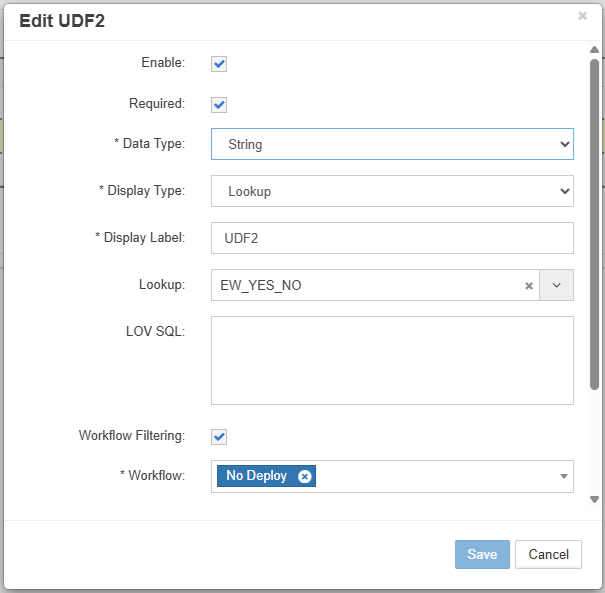
Edit UDF Dialog
- Right-click field in column and select Edit properties to enter edit mode
- Configure field properties
- Click Save icon to apply changes
Use Cases for UDFs
| Field | Common Uses | Example Values |
|---|---|---|
| UDF1 | Request categorization | New/Change/Delete |
| UDF2 | Business context | Project codes, regions |
| UDF3 | Tracking references | Ticket numbers, dates |
Best Practices
1. Email Configuration
- Verify Sender Address - Complete AWS SES verification
- Use Environment Prefixes - Clear identification
- Monitor Failed Emails - Configure forwarding address
- Test in Non-Production - Use override address
2. Performance Tuning
- Adjust Timeouts - Based on data volumes
- Optimize Intervals - Balance performance vs. load
- Set File Limits - Prevent system overload
- Monitor Services - Check service intervals
3. Security Settings
- Enable Workflow Security - Restrict dashboard access
- Configure Authentication - LDAP/MSAD properly
- Audit Debug Settings - Control logging levels
- Regular Purging - Maintain debug retention
4. User Experience
- Consistent Date Format - Organization-wide standard
- Appropriate Pagination - Based on data volumes
- Clear UDF Labels - Business-friendly names
- Helpful Descriptions - Guide users
Troubleshooting
Common Issues
| Issue | Setting to Check | Solution |
|---|---|---|
| Emails not sending | From Email Address | Verify AWS SES verification |
| Import timeouts | Application Import TimeOut | Increase timeout value |
| Slow dashboard | Auto Refresh Interval | Increase interval |
| Large file failures | Maximum file size settings | Adjust limits |
| Missing debug logs | Debug Level, Turn on debug | Enable debugging |
| Authentication issues | User Authentication Directory Type | Verify LDAP/MSAD settings |
Critical Settings Reference
High Impact Settings
These settings significantly affect system behavior:
- Disable All Logic Builder Scripts - Stops all automation
- Database Trace - Performance impact when enabled
- Service Sleep Intervals - Affects responsiveness
- File Size Limits - Can block operations
Getting Help
When contacting support, provide: - Current setting values (screenshot) - Error messages - Debug log excerpts - System behavior description
Migration Considerations
When migrating between environments:
Settings to Update
- Email Settings
- From Email Address (environment-specific)
- Override Email (remove in production)
-
Subject Prefix (change per environment)
-
Application Settings
- EPMware Application URL
- Organization Logo URL
-
Debug Level (reduce in production)
-
Directory Paths
- Stage DB Directory
- Temp DB Directory
- Archive DB Directory
Settings to Preserve
- File size limits
- Timeout values
- Service intervals
- User Defined Fields
- Date formats
Configuration Backup
Export Global Settings before major changes using the Migration module.
Related Topics
- Email Templates - Use email settings in templates
- Workflow Configuration - Workflow security settings
- Logic Builder - Script debugging settings
- Adminstration Module - Services and Application Migration