Learn More: Property Configuration Attributes Examples
General Attributes
Ancestor Inheritance
Ancestor Inheritance allows property values to be automatically inherited from parent members in the hierarchy.
Available Options:
| Option | Description |
|---|---|
| Enabled - Override Allowed | Descendant members inherit the property value from their ancestors by default. Users may override the inherited value at any descendant member level. |
| Enabled - Override Not Allowed | Descendant members inherit the property value from their ancestors. Users cannot override the inherited value; all descendants must use the inherited value. |
Example 1: Enabled - Override NOT Allowed
Property Name: Cost Center
Ancestor Inheritance: Enabled - Override Not Allowed
Consider the following hierarchy:
Total Company      Cost Center = NULL
│
├── North America  Cost Center = NULL
│   ├── USA        Cost Center = NULL
│   └── Canada     Cost Center = NULL
│
└── Europe         Cost Center = NULL
    ├── Germany    Cost Center = NULL
    └── France     Cost Center = NULL
- Create a request and update the Cost Center property of member Total Company to GLOBAL,the property value is automatically propagated to all descendants.
Inherited Results:
Total Company      Cost Center = GLOBAL
│
├── North America  Cost Center = GLOBAL
│   ├── USA        Cost Center = GLOBAL
│   └── Canada     Cost Center = GLOBAL
│
└── Europe         Cost Center = GLOBAL
    ├── Germany    Cost Center = GLOBAL
    └── France     Cost Center = GLOBAL
- Create a new member Poland under Europe.
- Since the parent member (Europe) has a Cost Center value of GLOBAL, the new member automatically inherits the same value.
Result:
Total Company      Cost Center = GLOBAL
│
├── North America  Cost Center = GLOBAL
│   ├── USA        Cost Center = GLOBAL
│   └── Canada     Cost Center = GLOBAL
│
└── Europe         Cost Center = GLOBAL
    ├── Germany    Cost Center = GLOBAL
    └── France     Cost Center = GLOBAL
    └── Poland     Cost Center = GLOBAL     <--- New Member Created
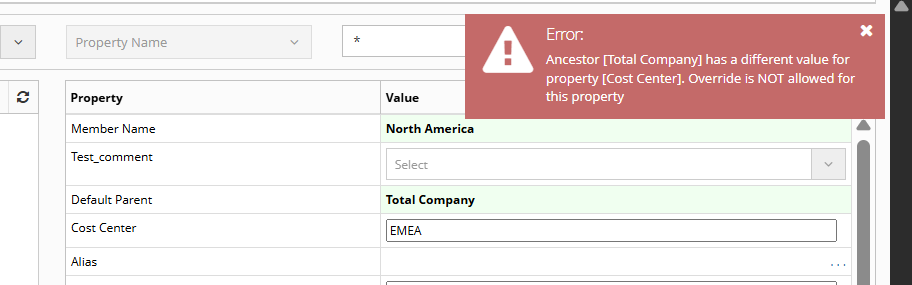
- Attempt to Override: If a user attempts to update the Cost Center property of member Germany to EMEA, the system will throw an error because overrides are not allowed for this property.
Example 2: Enabled - Override Allowed
Property Name: Cost Center
Ancestor Inheritance: Enabled - Override Allowed
Consider the following hierarchy:
Total Company      Cost Center = GLOBAL
│
├── North America  Cost Center = GLOBAL
│   ├── USA        Cost Center = GLOBAL
│   └── Canada     Cost Center = GLOBAL
│
└── Europe         Cost Center = GLOBAL
    ├── Germany    Cost Center = GLOBAL
    └── France     Cost Center = GLOBAL
Override an Inherited Value
-
Edit member Europe and update the Cost Center property to EMEA.
-
Since overrides are allowed, the value is updated on Europe and inherited by its descendants.
Result:
Total Company      Cost Center = GLOBAL
│
├── North America  Cost Center = GLOBAL
│   ├── USA        Cost Center = GLOBAL
│   └── Canada     Cost Center = GLOBAL
│
└── Europe         Cost Center = EMEA     <-- Property edited
    ├── Germany    Cost Center = EMEA
    └── France     Cost Center = EMEA
Any new members created under Europe will inherit EMEA, while members under North America will continue to inherit GLOBAL.
Derived SQL
The Derived SQL attribute allows users to display dynamically calculated property values based on a SQL query.
Properties with Derived Property enabled do not store values in the database. Instead, the value is calculated at runtime using the SQL defined in the Derived SQL field.
Derived properties are displayed in:
- Metadata Explorer
- Request Pages
- Other property display screens
Note
The Derived Property flag must be enabled for the Derived SQL to be executed.
SQL Construct
The SQL statement must:
- Return exactly one column
- Return exactly one row
- Be a valid SQL query
The following parameters can be referenced within the SQL and are automatically populated at runtime.
| Parameter | Syntax In SQL | Description |
|---|---|---|
| app_id | :app_id |
Application ID |
| app_dimension_id | :app_dimension_id |
Application Dimension ID |
| member_id | :member_id |
Member ID |
| member_name | ':member_name' |
Member Name (must be enclosed in single quotes) |
| hierarchy_id | :hierarchy_id |
Hierarchy Node ID |
| prop_name | ':prop_name' |
Property Name (must be enclosed in single quotes) |
Example
In the Account dimension of the Essbase application, to see the Description of the same member but from the EBS application. Derived SQL will utilize the current member and pass it to a function along with additional parameters as shown below.
SELECT ew_hierarchy.get_member_desc(
           p_app_name    => 'EBS',
           p_dim_name    => 'Account',
           p_member_name => ':member_name'
       )
FROM dual;
Default attribute
Default Values (using SQL)
This field will allow users to assign a Default Value whenever a New Member is created using SQL.
SQL Construct
SQL should have one column and only return one row. In SQL, the following parameters are used in the SQL which will be filled with actual values during run time.
| Parameter | Syntax In SQL | Description |
|---|---|---|
| app_id | :app_id |
Application ID |
| app_dimension_id | :app_dimension_id |
Application Dimension ID |
| member_id | :member_id |
Member ID |
| member_name | ':member_name' |
Member Name (must be enclosed in single quotes) |
| hierarchy_id | :hierarchy_id |
Hierarchy Node ID |
| prop_name | ':prop_name' |
Property Name (must be enclosed in single quotes) |
Example
In the Product dimension of the Essbase application, to assign a Default Value to the UDA property of the new member being created and the logic is dependent on the Parent Member’s Prefix. A Custom Lookup is created which helps to map the first digit of the parent member to a desired value of the UDA. “Default Value using SQL” will utilize the current member and pass to a function along with additional parameters as shown below.
/* Select Parent Member of the Current node and compare its
   first digit with a lookup code. If matches then assign value IT
   else Non IT
*/
SELECT CASE WHEN ew_global.chk_lookup_code_exists
                  (p_name  => 'OF_IT_MEMBERS'
                  ,p_code  => SUBSTR(h.parent_member_name,1,1)
                  ) = 'Y'
              THEN 'IT'
              ELSE 'Non IT'
         END prop_value
 FROM ew_hierarchy_details_v h
WHERE 1=1
  AND h.app_dimension_id  = :app_dimension_id
  AND h.hierarchy_id      = :hierarchy_id
Default Value (using SQL for Shared Members only):
This SQL is used to assign a Default Value for Shared Members only. SQL Construct and requirements are similar to “Default Value (using SQL)” field except this is used only whenever Shared Members are being created.
Default Value (using SQL for Root Members only):
This SQL is used to assign a Default Value for New Members created directly under Root only. SQL Construct and Requirements are similar to the “Default Value (using SQL)” field except this is used only whenever New Members are being created under the root node.
Display Attributes
Conditional Display SQL
This field will allow users to display a property conditionally using a SQL.
SQL Construct
SQL should have one column and return one row only. Value from the SQL should return Y if the property needs to be displayed. Any other value (or no value) will not display the property. In SQL, the following parameters can be used in the SQL which will be filled with actual values during run time.
| Parameter | Syntax In SQL | Description |
|---|---|---|
| app_id | :app_id |
Application ID |
| app_dimension_id | :app_dimension_id |
Application Dimension ID |
| prop_name | ':prop_name' |
Property Name (must be enclosed in single quotes) |
Example
In the Essbase application, a custom property is created called “Business Justification” for the “Generic” Dimension Class. As this class has multiple dimensions associated with it, users would prefer to display this property only for Geography and Products dimensions and not all other dimensions of this class.
SELECT CASE WHEN dim_name IN ('Geography','Products') THEN 'Y'
            ELSE 'N'
       END conditional_display
FROM ew_app_dimensions_v
WHERE app_dimension_id = :app_dimension_id;
Conditional Gray Out SQL
This field will allow users to make a property read only conditionally using a SQL
SQL Construct
SQL should have one column and only return one row. Value from the SQL should return Y if the property needs to be grayed out. Any other value (or no value) will not gray out the property. In SQL, the following parameters can be used in the SQL which will be filled with actual values during run time.
| Parameter | Syntax In SQL | Description |
|---|---|---|
| app_id | :app_id |
Application ID |
| app_dimension_id | :app_dimension_id |
Application Dimension ID |
| member_id | :member_id |
Member ID |
| member_name | ':member_name' |
Member Name (must be enclosed in single quotes) |
| hierarchy_id | :hierarchy_id |
Hierarchy Node ID |
| prop_name | ':prop_name' |
Property Name (must be enclosed in single quotes) |
Example
In the Essbase application, a standard property called “AssociatedSmartList” is created which is grayed out if the value for the Type property is not “Text” for the same member.
SELECT DECODE(prop_value,'Text','N', 'Y') readonly_flag
FROM ew_member_props mp
    ,ew_props p
WHERE mp.prop_id      = p.prop_id
  AND mp.member_id    = :member_id
  AND prop_name       = 'Type'
Dynamic Label SQL
This field will allow users to change the property label dynamically depending on the SQL value.
SQL Construct
SQL should have one column and only return one row. Value from the SQL should return the property label. In SQL, the following parameters can be used in the SQL which will be filled with actual values during run time.
| Parameter | Syntax In SQL | Description |
|---|---|---|
| app_id | :app_id |
Application ID |
| app_dimension_id | :app_dimension_id |
Application Dimension ID |
| prop_name | ':prop_name' |
Property Name (must be enclosed in single quotes) |
Example
In the Essbase application, a custom property is created called “Business Justification” for the “Generic” Dimension Class. As this class has multiple dimensions associated with it, users would prefer to display this property with different labels for Geography and Product dimensions.
SELECT CASE WHEN dim_name IN ('Geography')
            THEN 'Justification for Geography'
            ELSE 'Justification for Products'
       END conditional_display
FROM ew_app_dimensions_v
WHERE app_dimension_id = :app_dimension_id
List of Values (LOV) SQL
This field will allow users to display choices in the property lookup (Display type is “List of Values” types such as regular List of Values, Vary by Dimension List of Values, Vary by Dimension Multi Selection List of Values).
SQL Construct
SQL should have four columns and return as many rows as needed. There is no restriction on # of rows returned from the query. The following parameters can be referred to in the SQL.
| Parameter | Syntax In SQL | Description |
|---|---|---|
| app_dimension_id | :app_dimension_id |
Application Dimension ID |
| prop_id | ':prop_id' |
Property ID |
Four Columns of the SQL construct are:
- Lookup_Code
- Meaning
- Description
- Seq_Num
Example
Users have created a custom property called “Online Store” for the Products dimension. Values for this property should be the list of base members from the “Stores” dimension but only from the “Online” branch. Also, users would like to see Member Description in the List but store only the Member Name of the Store.
LOV SQL to be assigned to the “Online Store” property is
SELECT m.member_name lookup_code
      ,m.member_name ||' - '||
      ,ew_hierarchy.get_member_desc(m.member_id) meaning
      ,NULL description
      ,rownum seq_num
 FROM ew_members_v m
     ,ew_app_dimensions_v d
 WHERE d.app_dimension_id = :app_dimension_id
   AND d.app_id           = m.app_id
   AND m.dim_name         = 'Stores'
   AND ew_hierarchy.is_base_member(p_member_id => m.member_id) = 'Y'
   AND 'Y' = ew_hierarchy.chk_primary_branch_exists
                       (p_app_dimension_id => m.app_dimension_id
                       ,p_parent_member_name => 'Online'
                       ,p_member_name        => m.member_name
                       )
 ORDER BY m.member_name
Mask SQL
Property Configuration where MASK SQL needs to be specified is as shown below in the “Display” tab.
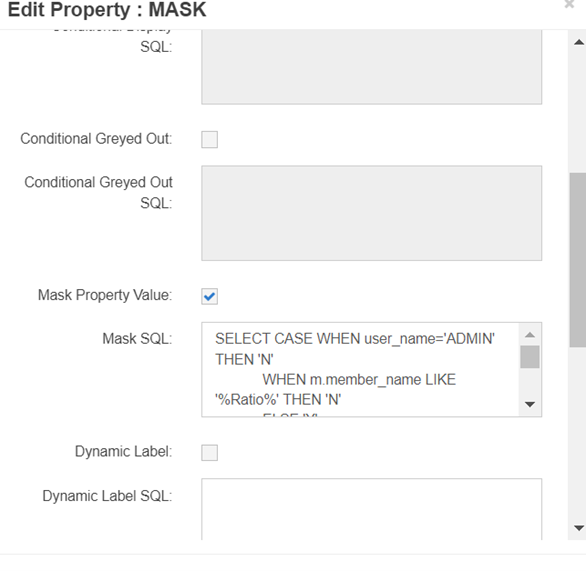
Following run time variables can be used in this MASK SQL. You can use one or more of these variables in the Mask SQL to define the logic.
| Syntax In SQL | Description |
|------ |---------------|-------------|
|:user_id | Current user’s User ID |
|:app_id | Application ID |
|:app_dimension_id | Application Dimension ID |
|:member_id | Member ID |
|':member_name' | Member Name (must be enclosed in single quotes) |
|:hierarchy_id | Hierarchy Node ID |
|':prop_name' | Property Name (must be enclosed in single quotes) |
SQL Construct
-- To Mask value

SELECT ‘Y’
FROM <tables>

-- To Not mask value
SELECT ‘N’ from DUAL
Example:
For example, see the following MASK SQL. In this example, if the current user is either ADMIN or member names have word “Ratio” in it then show the property values of the members, else mask them.
SELECT CASE WHEN user_name='ADMIN' THEN 'N'
            WHEN m.member_name LIKE '%Ratio%' THEN 'N'
            ELSE 'Y'
       END mask_prop
FROM ew_users u, ew_members m
WHERE u.user_id = :user_id
AND m.member_id = :member_id
Deploy Attributes
Conditional Deploy SQL
This field will allow users to deploy property values conditionally.
SQL Construct
SQL should have one column and only return one row. The value returned should be Y or N (or NULL). If the value returned is Y then the property will be included in the deployment files. In SQL, the following parameters can be used in the SQL which will be filled with the actual values during run time.
| Parameter | Syntax In SQL | Description |
|---|---|---|
| app_id | :app_id |
Application ID |
| app_dimension_id | :app_dimension_id |
Application Dimension ID |
| member_id | :member_id |
Member ID |
| member_name | ':member_name' |
Member Name (must be enclosed in single quotes) |
| hierarchy_id | :hierarchy_id |
Hierarchy Node ID |
| prop_name | ':prop_name' |
Property Name (must be enclosed in single quotes) |
Example:
In TRCS (or any other Oracle cloud) application, UDA property does not need to be deployed if the member is a seeded member. In this example, whether a member is seeded or not is determined by another property called “Operation”. If this property is populated, then the member is a seeded member.
SELECT CASE WHEN
         ew_hierarchy.get_member_prop_value
              (p_prop_label => 'Operation'
              ,p_hierarchy_id => :hierarchy_id
              ,p_app_dimension_id => :app_dimension_id) IS NULL
            THEN 'Y'
       ELSE 'N'
       END deploy_flag
FROM dual