Dimension Configuration
Dimensions contain the hierarchies for the application and provide the foundation for metadata management in EPMware. This section covers the configuration and management of dimension classes, hierarchies, properties, mapping, and hierarchy actions.
Overview
The Dimensions module is comprised of the following components:
- Dimension Classes - Highest level component that groups dimensions
- Dimension Configuration - Define dimension attributes and settings
- Dimension Properties - Configure dimension-specific properties
- Dimension Mapping - Associate dimensions across applications
- Hierarchy Actions - Configure actions for dimension hierarchies
Dimension Classes
Dimension classes are the highest level component of dimensions. A dimension class can contain one or many dimensions, providing a logical grouping for related hierarchies.
Key Features
- Hierarchical Organization - Group related dimensions under a single class
- Action Set Assignment - Assign hierarchy action sets to control available operations
- Inheritance - Dimensions inherit properties from their parent class
- Security Integration - Apply security at the class level
Hierarchy Action Sets
EPMware includes pre-built hierarchy action sets for each application type:
- ANAPLAN - Hierarchy Actions
- Essbase - Hierarchy Actions
- FCCS - Hierarchy Actions
- FDMEE - Hierarchy Actions
- GENERIC - Hierarchy Actions
- HFM - Hierarchy Actions
- HSS - Hierarchy Actions
- ORACLE EBS - Hierarchy Actions
- ORACLE Fusion Cloud - Hierarchy Actions
- OneStream - Hierarchy Actions
- PBCS - Hierarchy Actions
- PCMCS - Hierarchy Actions
- Planning - Hierarchy Actions
- SAP Business Objects - Hierarchy Actions
- TRCS - Hierarchy Actions
Note
Hierarchy action sets are automatically assigned to dimension classes based on the application type. Custom action sets can be created for specific business requirements.
Common Dimension Classes
| Class Type | Description | Typical Dimensions |
|---|---|---|
| Financial | Core financial reporting dimensions | Account, Entity, Currency |
| Organizational | Business structure dimensions | Department, Cost Center, Region |
| Product | Product and service hierarchies | Product Line, Brand, Category |
| Generic | Flexible, multi-purpose dimensions | Custom1-8, User Defined |
Best Practice
Create dimension classes that align with your business structure. This simplifies administration and improves user experience.
Configuration Steps
- Navigate to Configuration → Dimensions → Classes
- Click the + icon to create a new class
- Configure class attributes:
- Name - Unique identifier for the class
- Hierarchy Action Set - Select from predefined sets
- Description - Document the class purpose
- Security Class - Optional security assignment

Dimension Classes configuration screen showing available classes
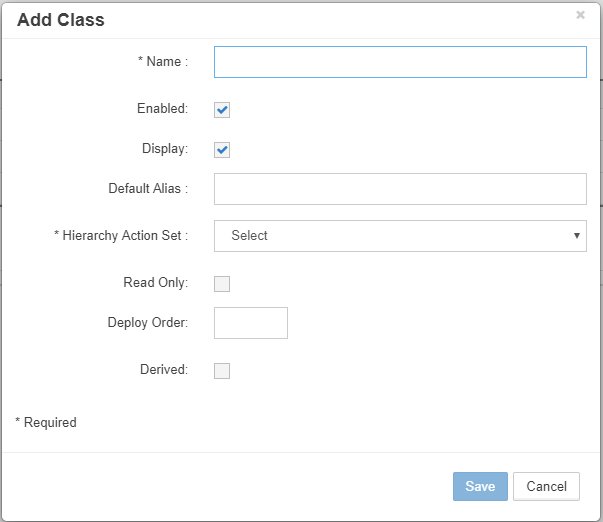
Add Class dialog with hierarchy action set selection
View Detailed Configuration Guide →
Dimension Configuration
Dimension configuration defines the attributes and behavior of individual dimensions within EPMware.
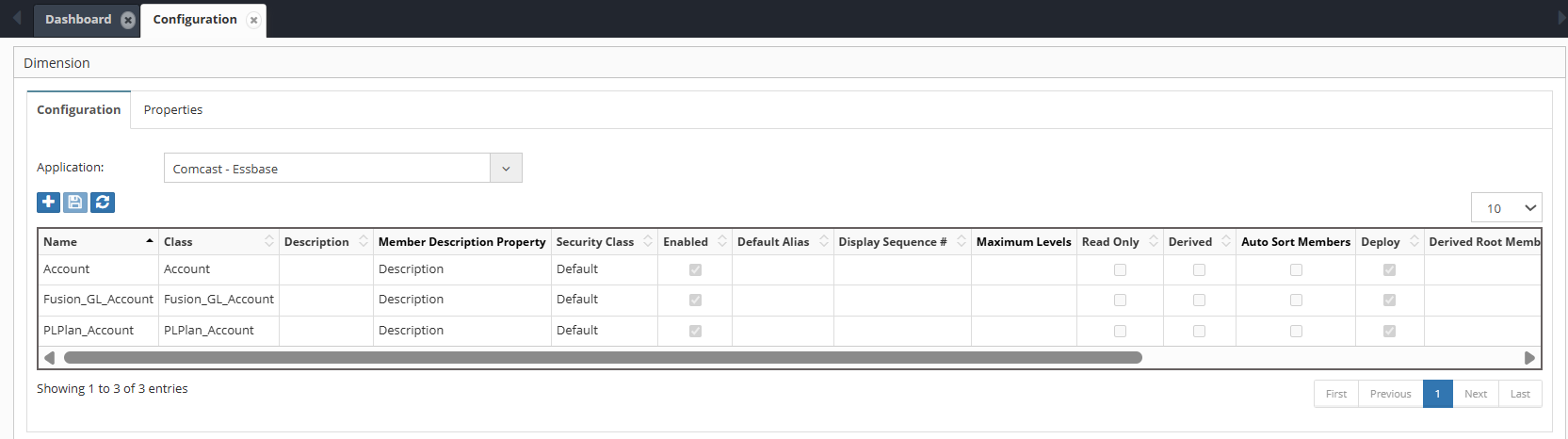
Dimension Configuration screen with application and dimension class filters
Core Attributes
| Attribute | Description | Impact |
|---|---|---|
| Dimension Class | Defines the category/group of the dimension (list of dimension classes). | Helps organize and manage dimensions logically. |
| Dimension | Lists dimensions imported from the target application or created for a generic application. | Identifies the dimension available for use in the system. |
| Description | User-defined description providing additional context for the dimension. | Improves clarity and maintainability. |
| Member Description Property | Specifies the property used as the member description. | Determines which property value is displayed as the member description.. |
| Security Class | Assigns a security class to the dimension. | Restricts access to authorized users. |
| Enabled | Enables or disables the dimension in EPMware. | Controls whether the dimension is available for use. |
| Default Alias | Sets the default alias for the dimension. | Determines how member names are displayed by default. |
| Display Sequence# | Defines the display order of the dimension within EPMware screens and lists. | Controls the sequence in which dimensions are displayed to users. |
| Maximum Levels | Specifies the maximum number of hierarchy levels allowed within the dimension. | Controls the depth of the hierarchy and enforces application constraints. |
| Read Only | Marks the dimension as non-editable. | Prevents modifications; useful for reference or controlled dimensions. |
| Derived | Flags the dimension as derived (calculated). Derived dimensions are read-only. | Indicates values are system-generated rather than manually maintained. |
| Derived Root Member | Specifies the root member for a derived dimension. | Defines the starting point of the derived hierarchy. |
| Derived SQL | SQL script used to populate the derived dimension. | Controls how derived data is generated dynamically. |
| Auto Sort Members using Member Name | When enabled, members are automatically sorted alphabetically by Member Name | Auto sort based on member name will be controlled |
| Allow Shared Members | Allow Insert Shared Members action for the Dimension. | Creation of shared member will be controlled by this property |
| Allow Activate/Inactivate Members | Allow Active/Inactive member action | member status can be changed |
Dimension Properties
Dimension properties store configuration values specific to each dimension, controlling behavior and integration settings.

Dimension Properties screen showing application and dimension specific properties
Property Categories
System Properties
- Hierarchy type (Stored/Dynamic)
- Consolidation settings
- Data storage options
- Calculation rules
Integration Properties
- Source system mappings
- Import/export settings
- Validation rules
- Transformation logic
Custom Properties
- User-defined attributes
- Business metadata
- Reporting tags
- Workflow parameters
Member Properties Configuration
For detailed configuration of member properties including categories, mapping, validation, and derivation, see the Member Properties section. This includes: - Property category assignment and workflow filtering - Property mapping across dimensions - Property validation scripts - Property derivation rules
Managing Properties
Properties can be added, edited, or removed based on business requirements:
- System Properties - Predefined, cannot be deleted
- Application Properties - Imported from target systems
- Custom Properties - User-created for specific needs

Add Dimension Properties dialog

Dimension Properties dialog for editing property values
View Detailed Configuration Guide →
Default Dimension Level Properties
Below properties will be common across all dimensions for the given application type.
| APP TYPE | DIM CLASS NAME | PROP NAME | PROP VALUE | DESCRIPTION |
|---|---|---|---|---|
| DATABRICKS | Dimensions | DATABRICKS_IMPORT_SQL | * Specify SQL to be executed in Databricks Database to fetch Metadata * | |
| ONESTREAM | Entity | INHERITED_MEMBERS_ENABLED | * Consolidated Dimension. This dimension has members from other dimensions * eg. Y/N | |
| ONESTREAM | Entity | INHERITEDDIM | OneStream Inherited Dimension | |
| ONESTREAM | Entity | INHERITED_DIM_LIST | OneStream Inherited Dimension List (Parent Dimensions) | |
| ORACLE-EBS | All | OVERRIDE_HIERARCHY_DEPLOY_FILE_NAME | EPMWARE_ |
** Optional - Specify File Name for Hierarchies Deployment File ** |
| ORACLE-EBS | All | OVERRIDE_VALUESET_DEPLOY_FILE_NAME | EPMWARE_ |
** Optional - Specify File Name for ValueSet Deployment File ** |
| ORACLE-FUSION-CLOUD | All | TREE_NAME | ** Specify Chart of Accounts Tree Name ** | |
| ORACLE-FUSION-CLOUD | All | TREE_VERSION | ** Specify Chart of Accounts Tree Version Name ** | |
| ORACLE-FUSION-CLOUD | All | TREE_START_DATE | ** Specify Chart of Accounts Tree Version start Date : YYYY/MM/DD ** | |
| ORACLE-FUSION-CLOUD | All | TREE_END_DATE | ** Specify Chart of Accounts Tree Version End Date : YYYY/MM/DD (Usually blank) ** | |
| ORACLE-FUSION-CLOUD | All | VALUE_SET_CODE | ** Specify Chart of Accounts Value Set Code ** | |
| ORACLE-FUSION-CLOUD | All | MAX_LENGTH | ** Specify Maximum Length of the member name ** | |
| ORACLE-FUSION-CLOUD | All | NUMERIC_MEMBER_NAME | N | ** Specify Y/N flag to indicate whether only numeric values are allowed for the member name ** |
Dimension Mapping
Dimension mapping enables synchronization between dimensions across different applications, ensuring consistency in master data.

Dimension Mapping configuration with sync options across applications
Property Mapping configuration video

Mapping Options
| Option | Description | Use Case |
|---|---|---|
| Sync | Full synchronization of members | Homogeneous hierarchies |
| Smart Sync | Conditional synchronization | Heterogeneous hierarchies |
| Script | Custom logic-based sharing | Complex transformations |
Mapping Workflow
graph LR
    A[Source Dimension] --> B{Mapping Type}
    B -->|Sync| C[Direct Copy]
    B -->|Smart Sync| D[Conditional Copy]
    B -->|Script| E[Transform & Copy]
    C --> F[Target Dimension]
    D --> F
    E --> F
Configuration Example
Scenario: Map Account dimension between HFM and Planning applications
- Select dimensions to map
- Choose mapping type (Sync/Smart Sync/Script)
- Configure options:
- Parent validation
- Property mapping
- Conflict resolution
Note
Each mapped dimension creates a line item in the request workflow, allowing reviewers to approve changes per application.
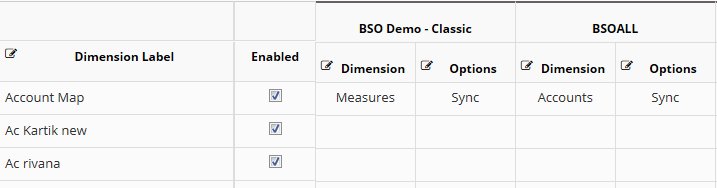
Example of mapping Measures dimension between BSO Demo Classic and BSOALL applications
View Detailed Configuration Guide →
Hierarchy Actions
Dimension Hierarchy Actions allows a Dimensions hierarchy action i.e. “Create Member” to trigger a pre or post action script. The script is created in the Logic Builder module and then selected in the Edit Hierarchy Actions Properties popup. A Security Class can be optionally assigned to specific hierarchy actions associated with the dimension. If a Security Class is assigned, then users with "Write" access to the security class are able to perform those actions for that dimension. For example, the "Delete Member" action can be restricted to certain users. The Hierarchy Actions can also be Enabled or Disabled.
For example, a Pre Action script can position a member added to a primary hierarchy into a specific location in a Shared hierarchy.

Hierarchy Actions configuration showing available actions and script assignments
To Create a Hierarchy Action
- Select the "+" icon to add a row to the top of the Grid
- Select the Hierarchy Action attributes
- Click on Save the row
To Edit a Hierarchy Action
- Right click on a row and select Edit Properties from the Menu to display the Edit Hierarchy Action Properties popup box.
- Edit the properties as required.
- Select Save to save the changes.
To Delete a Hierarchy Action
- Right click on a row and select Delete from the Menu.
- The following confirmation popup will display.
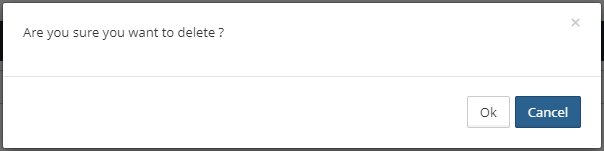
- Select OK to delete the Hierarchy Action
Available Actions
A Hierarchy Action Set is a group of hierarchy actions that can be performed by a user within a request to make changes to a dimension. Examples include Create Member, Edit Properties, Delete Member, and others.
Hierarchy Action Sets are prebuilt and automatically assigned to every Dimension Class. If a new Dimension Class is created, an appropriate Hierarchy Action Set can be assigned to it.
The following Hierarchy Action Sets are available:
- ANAPLAN - Hierarchy Actions
- Essbase - Hierarchy Actions
- FCCS - Hierarchy Actions
- FDMEE - Hierarchy Actions
- GENERIC - Hierarchy Actions
- HFM - Hierarchy Actions
- HSS - Hierarchy Actions
- ORACLE EBS - Hierarchy Actions
- ORACLE Fusion Cloud - Hierarchy Actions
- OneStream - Hierarchy Actions
- PBCS - Hierarchy Actions
- PCMCS - Hierarchy Actions
- Planning - Hierarchy Actions
- SAP Business Objects - Hierarchy Actions
- TRCS - Hierarchy Actions
Note
Some hierarchy actions may be excluded from specific Hierarchy Action Sets where the action is not applicable to the target application.
The following hierarchy action codes are available across supported Hierarchy Action Sets.
| Hierarchy Action | Description | Excluded From |
|---|---|---|
| Copy | Allows users to copy members and their properties from one application/dimension to another application/dimension. This action is followed by a Paste action (Paste as Child, Paste as Sibling, or Paste as Replace). | None |
| Cut | Allows users to move members (either primary or shared instances). Users can select one or more members from the hierarchy. This action is followed by a Paste action (Paste as Child or Paste as Sibling). | None |
| Paste | Pastes members that were previously selected using the Copy or Cut action. | None |
| Create Member | Creates new members as either child members or sibling members. | None |
| Insert Member | Creates members by selecting them from another application instead of manually entering member names. Useful when Dimension Mapping is not configured between applications. | None |
| Clone Member | Creates a new member using the selected member as a template and copies all of its properties. | None |
| Edit Properties | Allows users to edit the properties of the selected member. | None |
| Reorder Children | Allows users to reorder child members under the selected parent member. | None |
| Delete Member | Allows users to delete one or more members and all of their descendants. Multiple members can be selected using CTRL or SHIFT keys. Separate request lines are created for each selected member. | ORACLE EBS |
| Rename Member | Allows users to rename the selected member in the hierarchy. | ANAPLAN, FDMEE, HSS, ORACLE EBS, ORACLE Fusion Cloud |
| Insert Shared Member | Allows users to create shared instances of selected members. Multiple members can be selected and added as child or sibling shared members. Only one request line is created even when multiple shared members are added. | ANAPLAN, FDMEE, HSS, ORACLE Fusion Cloud, SAP Business Objects |
| Remove Shared Member | Allows users to remove specific shared instances of a member from the hierarchy. | ANAPLAN, FDMEE, HSS, ORACLE Fusion Cloud, SAP Business Objects |
| Activate Member | Allows users to activate members that were previously inactivated. | Applicable only to the GENERIC Hierarchy Action Set |
| Inactivate Member | Allows users to inactivate active members and all of their descendants. Once inactivated, no other hierarchy action is permitted except Activate Member. | Applicable only to the GENERIC Hierarchy Action Set |
Action Scripts
Enhance hierarchy actions with Logic Builder scripts:
- Pre-Action Scripts - Validate before executing
- Post-Action Scripts - Automate follow-up tasks
Upload Hierarchy Actions
The Upload Hierarchy Actions option allows users to load multiple hierarchy actions in bulk using a ".csv" template instead of manually creating a mapping.
Process:
- Click on "Upload Hierarchy Actions" Option.
- Click Download template , it will download the .csv file.
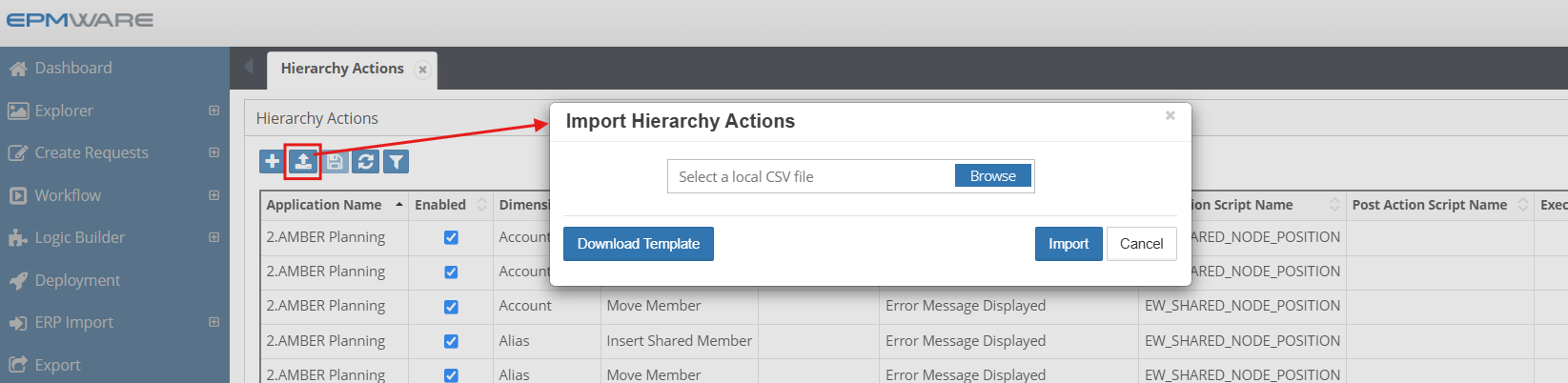
- Fill the template and upload the file.

Best Practices
1. Dimension Design
- Standardize Naming - Use consistent naming conventions
- Document Purpose - Maintain clear descriptions
- Plan Hierarchies - Design before implementation
- Consider Growth - Allow for future expansion
2. Performance Optimization
- Limit Depth - Keep hierarchies reasonably shallow
- Optimize Scripts - Test and tune SQL/Logic scripts
- Archive Inactive - Remove or hide obsolete members
- Index Properly - Ensure database indexes are maintained
3. Security & Governance
- Layer Security - Apply at appropriate levels
- Audit Changes - Enable comprehensive logging
- Review Regularly - Periodic access reviews
- Document Policies - Maintain governance documentation
4. Integration Management
- Test Mappings - Validate in non-production first
- Monitor Sync - Check mapping logs regularly
- Handle Conflicts - Define resolution strategies
- Version Control - Track configuration changes
Troubleshooting
Common Issues
| Issue | Possible Cause | Solution |
|---|---|---|
| Members not syncing | Mapping disabled | Check mapping configuration and enable |
| Hierarchy actions grayed out | Insufficient permissions | Verify security class assignments |
| Derived dimension empty | SQL error | Review SQL script and test independently |
| Import failures | Property mismatch | Validate property mappings |
Getting Help
- Check the detailed configuration guide
- Review application-specific requirements
- Contact EPMware support for assistance